 z
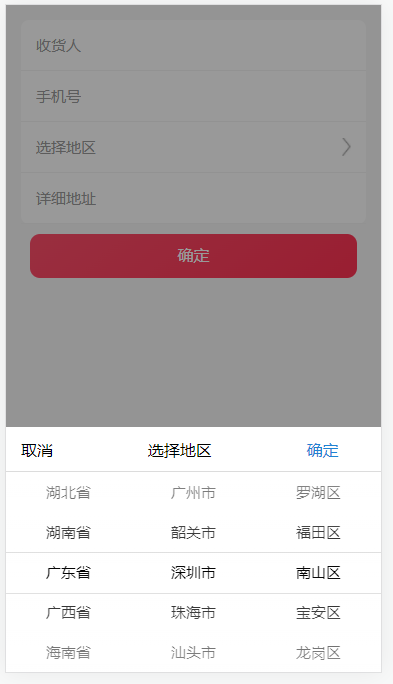
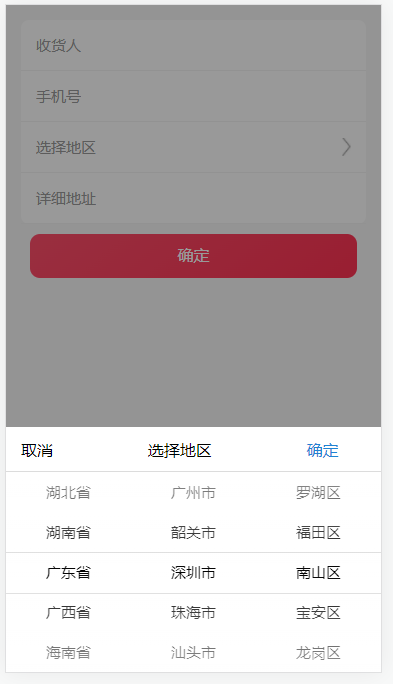
z 类似小程序选择省市区地址布局
.address-box {
position: fixed;
top: 0;
left: 0;
right: 0;
bottom: 0;
width: 100%;
height: 100vh;
background: #f7f7f7;
padding: 15px;
text-align: center;
.input-list {
background-color: #fff;
border-radius: 8px;
.input-item {
display: flex;
align-items: center;
justify-content: space-between;
border-bottom: 1px solid #f4f4f4;
padding: 15px;
.title {
font-size: 15px;
color: #999;
}
input {
flex: 1;
outline: none;
border: none;
padding-left: 5px;
}
img {
width: 9px;
}
}
}
.address-btn {
height: 44px;
width: 95%;
background: linear-gradient(139deg, #ff4e6a, #ff3252);
border-radius: 10px;
font-size: 16px;
color: #fff;
line-height: 44px;
text-align: center;
margin: 10px auto;
cursor: pointer;
border: none;
outline: none;
}
}
<link rel="stylesheet" href="static/css/area.css">
<div class="address-box">
<div class="input-list">
<div class="input-item">
<div class="title">收货人</div>
<input type="text" id="name">
</div>
<div class="input-item">
<div class="title">手机号</div>
<input type="text" id="tel">
</div>
<div class="input-item">
<div class="title">选择地区</div>
<input id="getArea" type="text" value="" readonly>
<img src="static/images/right1.png" alt="">
</div>
<div class="input-item">
<div class="title">详细地址</div>
<input type="text" id="address">
</div>
</div>
<button class="address-btn">确定</button>
</div>
<script src="static/js/area.js"></script>
// 获取省市区
$('#getArea').getArea({
defaultArea: [18, 2, 3],
inpEle: '#getArea',
normalArea: true
});
免责申明:
1. 本站所有教程、文章或资源分享目的仅供大家学习和交流!
2. 如有无法查看或链接失效,麻烦请报告联系管理员处理!
3. 本站无法保证资源或其时效性,恕不接受任何提问。
4. 在本站下载的源码严禁杜绝任何形式的正式商业用途,请去程序官方购买。 所有资料均来自于网络,版权归原创者所有!本站不提供任何保证,并不承担任何法律责任,如果对您的版权或者利益造成损害,请提供相应的资质证明,我们将于3个工作日内予以删除。